Nose Job Simulator: Preview Rhinoplasty on Your Photo
Try Simulator Free
Preview a Nose Job on Your Own Photo
A nose job simulator takes a photo of your face and shows what it could look like with a different nose: a smaller bump, a narrower bridge, a lifted or slimmer tip. Rhinoplasty costs $7,000 to $15,000 in the US and it's one of the few surgeries where you can't really try before you buy, so a preview on your own face is the closest thing to a test run.
The catch is that your nose is in the middle of your face, and tiny changes go a long way. Two millimeters off the bridge can look like a totally different person in profile. A good preview respects that. Here's how to get one that's realistic, what to look for, and how to use it so your surgeon understands what you want.
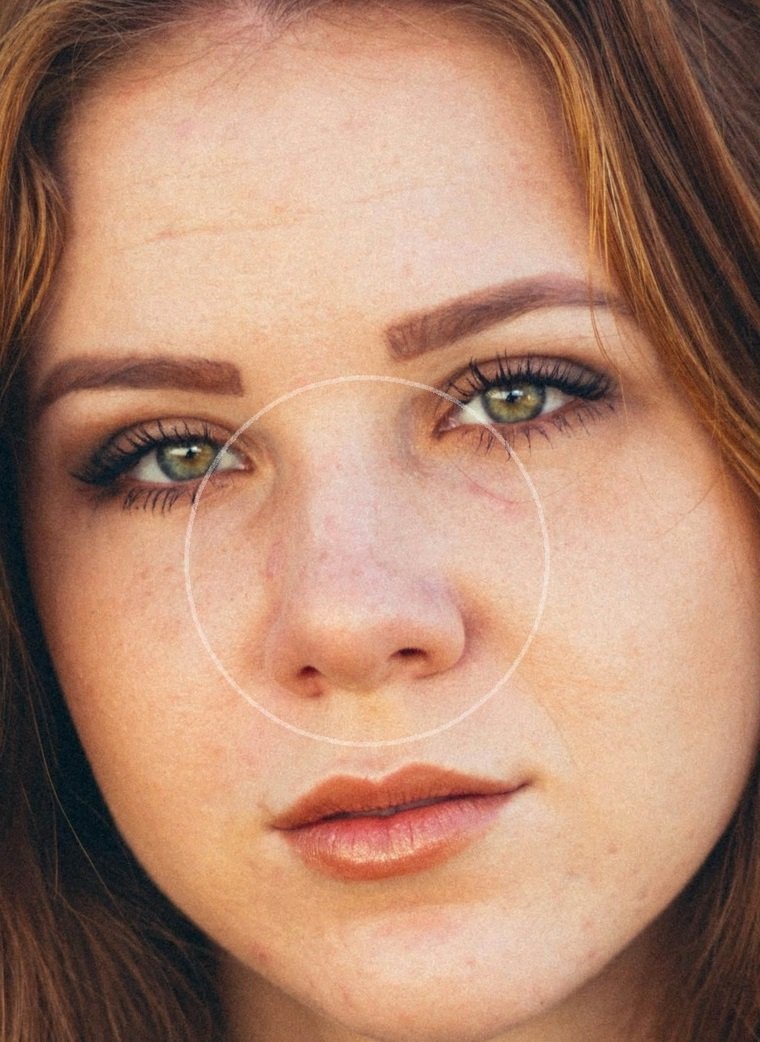 Before
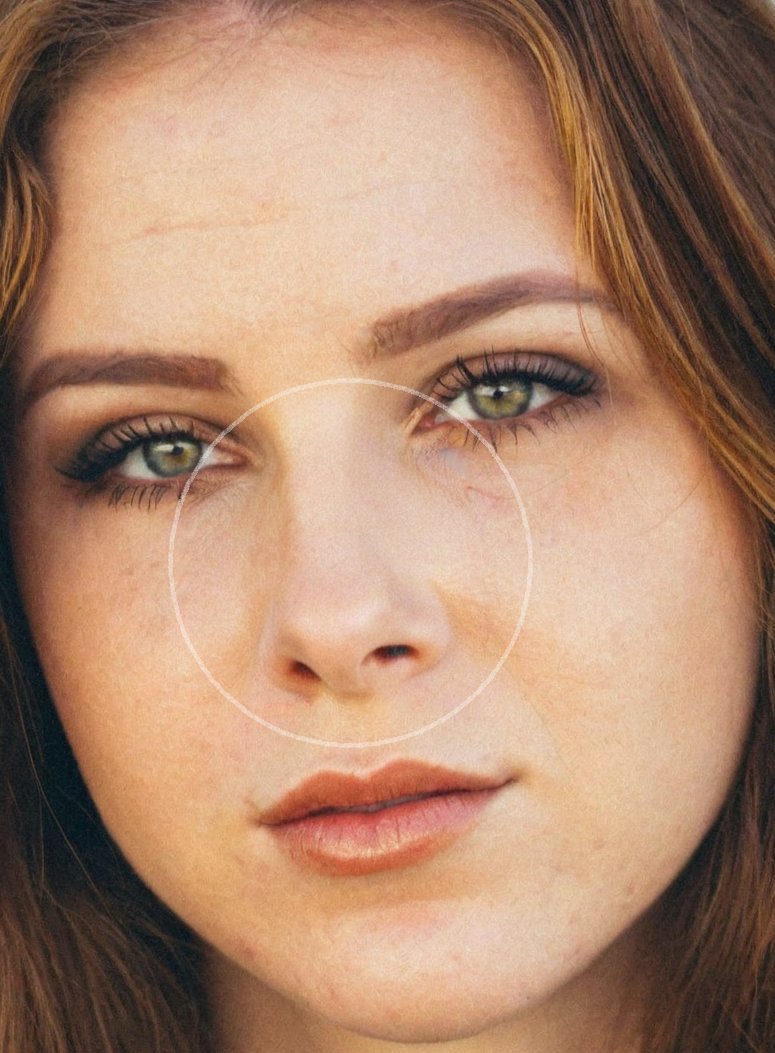 After
AfterWhat a Realistic Rhinoplasty Simulator Should Change
Most nose jobs change one to three things. Shaving down a dorsal hump (the bump on the bridge) is the most common. Narrowing a wide bridge comes next, usually by breaking and moving the nasal bones inward. Then there's tip work: making a bulbous tip slimmer, lifting a drooping one, or adjusting how far it sticks out. Some people also want smaller nostrils, which is a separate step called alar base reduction.
So a believable preview changes the nose and nothing else. Your eyes, lips, chin, skin and face shape should be identical in both photos. If the after shot also smooths your skin or slims your cheeks, the nose will look better than it really would, because everything around it got edited too.
Watch out for the tiny, scooped "filter nose" as well. A narrow, pinched tip with a deep curve on the bridge looks fine in a selfie filter and odd on a real face, especially from the side. Surgeons also have limits: thick skin won't shrink-wrap around a very fine tip, and you can only remove so much cartilage before the nose loses support and starts to collapse when you breathe in.
Common Nose Changes and How They Show Up in a Preview
Hump Removal
What changes: The bridge becomes straighter in profile
Best angle to judge it: Side view
Realistic preview: Straight or very slightly curved, not a deep ski slope
Tip Refinement
What changes: A round or wide tip looks slimmer and more defined
Best angle to judge it: Front and three-quarter view
Realistic preview: A softer, narrower tip, not a pinched point
Narrower Bridge or Nostrils
What changes: The nose looks thinner from the front
Best angle to judge it: Front view, face relaxed
Realistic preview: A few millimeters narrower, still in line with the inner corners of your eyes
How to Take Photos for a Nose Job Photo Editor
Phone cameras distort noses. Hold a phone 30 cm from your face and your nose looks up to 30% bigger than it does in person, which is why so many people hate their selfies. For a preview you can trust, prop the phone at eye level about 1.5 meters away and zoom in a little, or have a friend take the shot. That's closer to how surgeons photograph noses.
Take three photos: straight on, full side profile and three-quarter (head turned about 45 degrees). Keep your face relaxed and your mouth closed. Smiling pulls the tip down and widens the nostrils, so a smiling photo can make a normal tip look droopy. Pull your hair back, skip contour makeup on the nose, and use soft light from in front of you. Overhead light makes a bump cast a shadow and look bigger than it is.
Profile is the photo most people skip and the one that matters most. Our example above is a front view, and the change looks fairly subtle there. From the side, that same kind of edit can look dramatic.
How to Judge Your Rhinoplasty Preview
- Flip between before and after fast: Only the nose should move. If you notice something else changing, start over with a new preview.
- Check it against your chin: A weak chin makes any nose look bigger in profile. If your preview still feels off from the side, try one with more chin too, or read about chin augmentation. Surgeons often pair the two.
- Make a subtle and a bold version: Most people end up liking the subtle one after a day or two. The bold one helps you see where "too much" starts.
- Ask if it still looks like family: Show it to someone close to you without explaining. If they say you look like a different person, the change might be bigger than you really want.
- Test the cheaper option: If your main issue is a small bump or a slightly low tip, a preview of that alone tells you whether filler might be enough. We compare both in rhinoplasty vs nose filler.
Take Your Preview to the Consultation
Words like "smaller" and "more refined" mean very different things to different surgeons. A front and side preview of your own face shows them the exact bridge line and tip shape you're picturing. A good surgeon will tell you which parts are realistic for your skin and cartilage and which aren't, and many will then run their own imaging to fine-tune it. You can make a preview in a few minutes with our rhinoplasty simulator, and if it's mostly the tip that bothers you, try the nose tip lift simulator too.
What a Nose Job Simulator Can't Show You
It shows the final result, and noses take longer to settle than almost any other surgery. The splint comes off after about a week and most bruising is gone by two weeks, but the tip stays swollen and a bit blunt for months. You'll look close to the preview at three to six months, and the final shape shows at around 12 months, up to 18 if you have thick skin. Our rhinoplasty recovery timeline walks through it month by month, so you don't panic at week six.
It also can't see inside your nose. A deviated septum, collapsing nostrils or weak cartilage change what's possible and sometimes what the surgery costs, since breathing repairs may be partly covered by insurance. And it can't predict how you heal. Thin skin shows every small irregularity, while thick skin hides detail, so the same surgeon can get different-looking results on two patients.
If you're still deciding whether you need surgery at all, our guide on how to reduce nose size covers contouring, filler and surgery side by side. Most people who use a simulator just want to know if the change they picture is worth it. Seeing it on your own face is a pretty good way to find out.
Frequently Asked Questions
Is there a nose job simulator that uses my own photo?
Yes. Photo-based apps let you upload a selfie and see a new nose shape on your actual face. They're more useful than generic sliders or stock faces because the result is judged against your own eyes, lips and chin.
How accurate is a rhinoplasty simulator?
It's a good guide to the shape you want, not a promise. It can't see your cartilage, skin thickness or septum, and it can't predict healing. Use it to agree on a goal with your surgeon, who will tell you what's realistic for your nose.
Which photo angle matters most for a nose job preview?
The side profile. Hump removal and tip rotation show up most from the side, and a change that looks subtle from the front can look large in profile. Always check a front, side and three-quarter view.
How much does a nose job cost?
In the US, cosmetic rhinoplasty usually runs $7,000 to $15,000 including surgeon, anesthesia and facility fees. Revision rhinoplasty often costs more, from $10,000 to $20,000 or above.
When will my nose look like the preview?
Most bruising clears in about two weeks and you'll look close to the preview at three to six months. The tip keeps refining for up to a year, sometimes longer with thick skin.
Preview Your Results Today
Use our AI-powered plastic surgery simulator to visualize how different procedures will look on you before making any decisions.
Download Free Simulator
Available on iOS & Android • No signup required • Unlimited simulations