Breast Augmentation Simulator: See Implants on Your Photo
Try Simulator Free
Preview Breast Augmentation on Your Own Photo
A breast augmentation simulator takes a photo of you and shows what your chest could look like with implants. That sounds simple, and the free online ones make it look like a toy (some are literally called games). But used properly, a preview on your own body is one of the most useful things you can do before spending $6,000 to $12,000 on surgery, because it answers the question every sizing chart dodges: what does this size look like on me, in my clothes, with my shoulders and my waist?
Most people who search for a breast simulator want to see two or three sizes side by side and get a gut feeling for which one is right. That's a good goal. Here's how to get a preview you can trust, what it can and can't tell you, and how to turn it into something your surgeon can actually use.
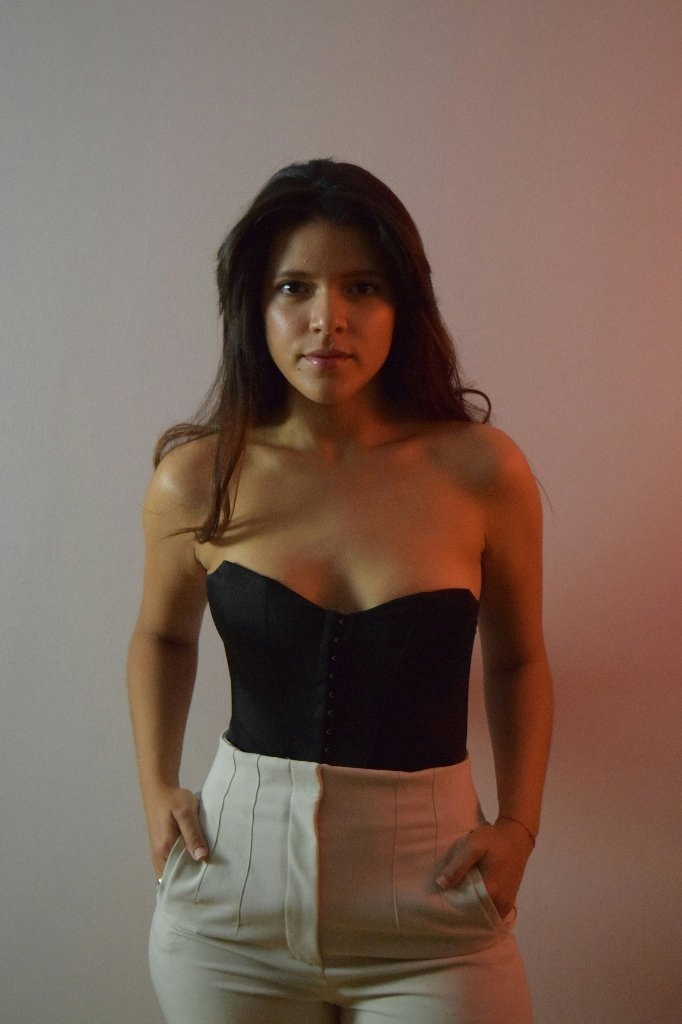 Before
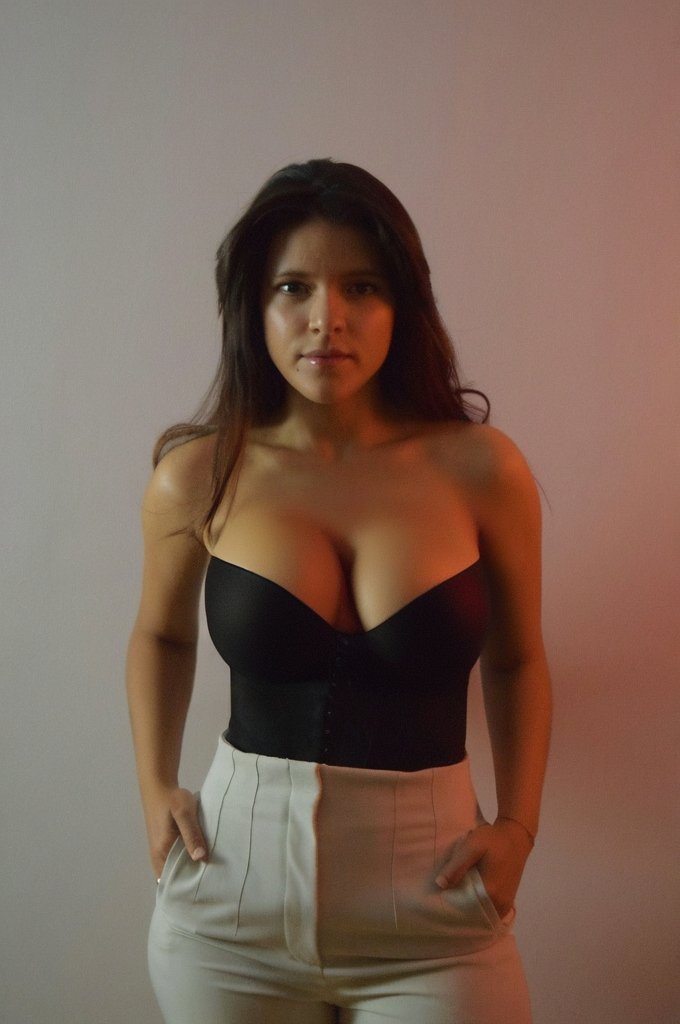 After
AfterWhat a Good Breast Implant Simulator Should Change
Implants add volume, mostly in the lower and middle part of the breast, with some fullness up top depending on the profile. So a realistic preview should make the bust larger and rounder while your ribcage, shoulders, waist and arms stay exactly where they were. Your nipple position should move only slightly, a centimeter or two at most. If the simulator lifts sagging breasts high up the chest, it's showing you a breast lift plus implants, which is a different operation with more scars and a higher bill.
Watch for previews that slim your waist, smooth your skin or change your posture at the same time. Those edits make the after shot look better than any surgery can, and you'll end up comparing your real result to a fantasy. The best test is to flip between before and after quickly. Only the breasts should move.
Free Online Simulators vs Apps vs 3D Imaging
Free Online "Games"
How it works: Drag a slider over a stock body or a cartoon figure
Cost: Free
Good for: Killing five minutes. It's not your body, so it tells you very little
Photo-Based AI Apps
How it works: Upload your own photo and the AI adds volume to your chest
Cost: Free to a few dollars
Good for: Comparing sizes on your real frame, at home, before any consultation
In-Office 3D Imaging
How it works: A 3D camera scans your torso and the surgeon loads specific implant models
Cost: Usually included in a paid consultation ($100 to $250)
Good for: Fine-tuning between two final implant choices with real dimensions
How to Take Photos for a Breast Augmentation Preview
Photo setup matters more than the app. Stand about two meters from the camera, or have a friend hold the phone at chest height. Shooting from above makes breasts look bigger and from below makes them look smaller, so keep the lens level. Stand straight with your arms relaxed at your sides, not pushed together or raised.
Wear something fitted and plain, like a sports bra, a tank top or a strapless top (the one in our example above works well). Patterned or padded tops throw off the AI and make it harder to judge volume. Soft light from the front is best. A window you're facing beats an overhead bulb, which casts shadows under the breast and exaggerates sag.
Take three shots: front, side and three-quarter. The side view is the one people forget, and it's where projection shows up. Two sizes can look almost the same from the front and very different in profile.
How to Use a Breast Size Simulator to Narrow Your Choice
- Start with three previews: A subtle one, a moderate one and a bold one. Most people's real answer sits in the middle, but you won't know until you see all three on yourself.
- Look at them a day later: First reactions tend to pick the biggest option. Come back the next day and see which one still feels like you.
- Check them in clothes, not just a bra: Take previews in a T-shirt and whatever you wear to work. A size that looks great in a strapless top might feel like a lot under a button-down shirt.
- Pair it with the rice test: One cup of uncooked rice is about 240cc. Our guide on how to choose breast implant size explains the stocking trick and how cc translates to cup size, so you can match the preview you like to a rough volume.
- Save the one you like and the one you don't: Showing a surgeon "this, not that" is clearer than any cup size you can say out loud.
Bring Your Preview to the Consultation
"I want to look natural" means a B cup to one person and a full D to another. A photo of your own body at the size you want removes that guesswork. A good surgeon will measure your breast base width, check your skin and tissue, and tell you honestly whether the preview fits inside the range your chest allows. You can make one in a couple of minutes with our breast augmentation simulator, and if your breasts sit low, try the breast lift simulator too so you can see whether you need both.
What the Simulator Can't Tell You
A photo can't measure you. The width of your chest, how much tissue covers the implant and how stretchy your skin is decide what size is safe, and those come from a tape measure and a pinch test, not from pixels. If your preview shows a 500cc look on a narrow frame with thin tissue, a surgeon may say no, and that's for good reason: oversized implants are a common cause of rippling, bottoming out and revision surgery later.
It also shows the final settled result, not week two. New implants sit high and tight for the first 6 to 12 weeks before they drop and soften into shape. People who compare their mirror to the preview in week three often think something went wrong. Our breast augmentation recovery guide walks through that timeline week by week.
And it can't tell you which method fits. If every preview feels like too much and you only want a half-cup boost, fat transfer might suit you better than implants. We compare cost, size limits and how predictable each one is in breast implants vs fat transfer.
Frequently Asked Questions
Is there a free breast augmentation simulator online?
Yes. Some free sites only let you drag a slider over a stock figure, which won't tell you much. Photo-based apps that work on your own picture are more useful because they show the change on your real frame, and many let you try a few previews for free.
How accurate is a breast implant simulator?
It's a good guide to how a size looks on your body, not a guarantee of the exact result. It can't measure your chest width, tissue thickness or skin stretch, so use it to pick a direction and then confirm the size with your surgeon's measurements and sizers.
Can a simulator tell me what cc implant I need?
Not directly. A photo preview shows a look, not a volume. Once you know which look you like, your surgeon matches it to an implant based on your breast base width and profile. Most US patients end up somewhere between 300cc and 400cc.
What's the difference between a photo simulator and 3D imaging?
A photo simulator works on a picture you take at home and is quick and cheap. 3D imaging uses a scanner in the surgeon's office and loads real implant models with exact dimensions. Many people use a photo preview first to narrow their goal, then 3D imaging at the consultation to choose the final implant.
When will I look like my preview after surgery?
Usually around three months. Implants sit high and look larger for the first 6 to 12 weeks while swelling goes down, then settle lower and softer. Judge your result against the preview only after that.
Preview Your Results Today
Use our AI-powered plastic surgery simulator to visualize how different procedures will look on you before making any decisions.
Download Free Simulator
Available on iOS & Android • No signup required • Unlimited simulations